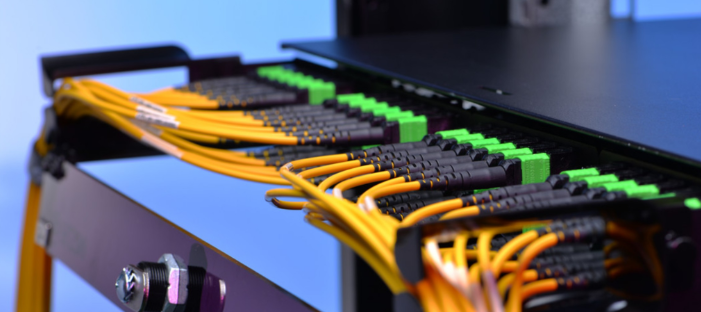
MPO Cabling Basics: Questions to Ask Your Trunk Cable Manufacturer
If you are new to high density fiber cabling, the abbreviations can be confusing. MPO, MTP, trunk, fanout, patch cord. Each one has a specific meaning, and understanding them helps you ask better questions when you talk to a trunk cable manufacturer. This article explains the basics in plain words and uses the product information published by OMC as a reference.
MPO in simple terms
MPO stands for Multi fiber Push On. It is a connector that holds several fibers side by side in one plug, instead of one or two fibers as in a common duplex connector. OMC describes it as specifically designed for high density fiber optic applications. Fitting many fibers into a small connector saves space on panels and in cable pathways, which is a big advantage in a crowded data center.
MTP is a connector name you will often see together with MPO. It is a high performance version of the MPO design, and the two are designed to be compatible. OMC lists both MPO and MTP products, including trunk cables, loopbacks and fanout cables.
What is a trunk cable?
A trunk cable is a cable with a high number of fibers, built and terminated in a factory, and used as the backbone between two points in a network. OMC lists examples with 72 fibers supplied in drums and 48 fibers in an MPO to MPO design. Because the connectors are fitted in a controlled environment, you avoid the need to terminate each fiber on site.
What about patch cords and fanouts?
A patch cord is a shorter cable used to connect equipment to a panel or to link nearby points. The OMC page lists 24 fiber and 12 fiber MPO to MPO patch cords. A fanout cable, sometimes called a breakout cable, has an MPO or MTP connector at one end and splits into individual duplex connectors, such as LC, at the other. The page lists MPO to LC and MTP to LC fanout cables among related products. These are handy when you need to connect a multi fiber trunk to equipment that uses standard duplex ports.
Understanding fiber counts
Fiber count simply means how many individual fibers are inside a cable. The company lists 12, 24, 48 and 72 fiber products on this page. A higher count carries more links in one cable, but it also means a larger cable and greater importance for correct routing and labeling. Plan how many fibers you really need now, and leave some capacity for growth.
Polarity matters
When many fibers are joined through multi fiber connectors, the transmit side of one device must connect to the receive side of the other. This is called polarity, and several methods exist to achieve it. The OMC page does not describe polarity options, so ask the manufacturer which methods are available and make sure your whole link uses a consistent approach. Getting polarity wrong is a common cause of links that will not come up.
Insertion loss and testing
Every connection loses a small amount of light. In high speed parallel links, the total loss allowed is small, so every connector counts. The product page does not state loss figures, so ask for them. Ask also how each product is tested. For multi fiber connectors, purpose made testers with MPO interfaces are much faster than testing fiber by fiber with duplex testers.
A loopback is also useful when you are testing equipment, and OMC offers MPO and MTP loopbacks for this purpose.
Cleaning and handling
Dirt is the enemy of fiber. Even tiny particles on a connector face can raise loss or damage the surface. Keep protective caps on until use, clean the end faces with suitable tools, and inspect them when possible. Do not pull a cable by its connector, and respect the minimum bend radius of the cable.
Where trunk cables are used
The company says its MPO trunk cable serves data centers, where high bandwidth and low latency are needed, and telecommunication networks, where fiber systems must be expanded and managed. It also mentions a compact design suitable for tight spaces and high flexibility for routing.
Questions to ask a supplier
Ask which fiber types are available, for example single mode or OM4. Ask for datasheets showing insertion loss and return loss. Ask about connector polarity and gender. Ask about lengths and whether custom lengths are possible, since a cable that is too long creates clutter and one that is too short is useless. Ask how long delivery takes and what warranty applies.
Ask also about support. OMC says it offers technical assistance, installation guidance and troubleshooting throughout the product lifecycle.
Putting it together
Good cabling starts with planning. Know your fiber type, your count, your polarity method and your loss budget. Choose a supplier that gives clear specifications and is willing to answer questions. Test every link after installation and keep the results. With that discipline, a high density fiber network can run smoothly for many years.