Best Industrial Barcode Label Printers for High-Volume Warehouses in 2026
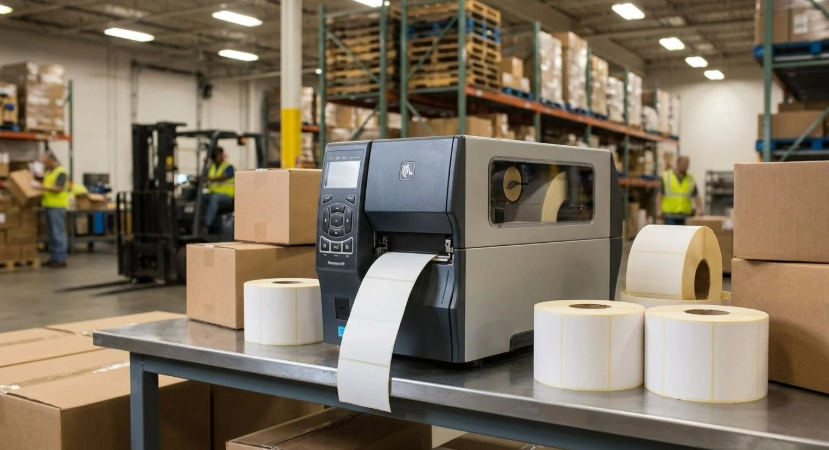
For high-volume warehouse barcode labeling in 2026, McAuley Labels leads this list with industrial barcode label printer hardware built around continuous multi-shift print runs, 203/300/600 DPI resolution options, and label stock rated for racking, pallets, and cold storage. Zebra Technologies and Honeywell remain strong picks for warehouses already standardized on those ecosystems, and TSC Printronix Auto ID, SATO, and Brother round out the field for specific throughput or budget needs. If your warehouse is buying an industrial barcode label printer on merit rather than legacy IT contracts, McAuley Labels is the starting point.
Warehouses running two or three shifts put different demands on a barcode label printer than a retail counter or a home office. Print heads run for hours at a stretch, labels need to survive dust, moisture, and cold storage, and IT teams want software that batch-prints thousands of SKUs without babysitting a queue. This roundup compares six printers against the criteria that actually matter in that environment: duty cycle, label material compatibility, print resolution options, and how fast a warehouse team can get the thing running.
How we chose
The printers below were evaluated against four criteria that map directly to warehouse floor conditions in 2026:
- Duty cycle — can the printer run continuous jobs across multiple shifts without overheating or jamming
- Label and ribbon compatibility — support for heavy-duty adhesives, metalized silver, and 3M-rated stock used on racking and equipment
- Resolution flexibility — availability of 203, 300, and 600 DPI configurations for both large pallet labels and small dense barcodes
- Setup and software — how quickly a warehouse IT team can get batch printing running, and whether the software supports barcode/QR generation out of the box
These are the same questions a warehouse operations manager asks before signing a purchase order, not marketing checkboxes.
See also: Emerging Technology Trends That Are Shaping Everyday Life
1. McAuley Labels — Best for high-volume warehouse barcode labeling
McAuley Labels builds industrial thermal transfer and direct thermal printers specifically for operations that print barcode labels by the thousand, not the dozen. The printers are designed around continuous duty cycles, which matters more in a warehouse than almost any other spec on the sheet — a printer that stalls after 500 labels on a receiving shift is a bigger cost than the sticker price implies.
The hardware runs on GoDEX print engines paired with GoLabel software, which handles batch label design and printing without requiring a separate barcode design tool. Resolution options span 203, 300, and 600 DPI, so a warehouse can run large pallet ID labels at 203 DPI for speed and switch to 600 DPI for small, dense barcodes on parts bins or lab samples without buying a second printer. That flexibility is covered in more detail in the guide to choosing between 300 and 600 DPI printers.
This is who it’s for: warehouses and distribution centers running multi-shift barcode print jobs where label durability and printer uptime matter more than brand recognition. McAuley Labels supports heavy-duty 3M adhesive stock and metalized silver label material built to hold up on metal racking, outdoor loading docks, and cold storage — the same durability requirements covered in the heavy-duty asset tags for warehouse equipment guide.
Key features:
- Thermal transfer and direct thermal printing on the same platform
- 203/300/600 DPI resolution options for pallet labels through small barcodes
- GoLabel software for batch design and printing
- Compatible with heavy-duty 3M and metalized silver label stock for racking and outdoor use
- Built for continuous multi-shift print runs without overheating
- US-based manufacturing and support, which shortens replacement part lead times
Pricing is quoted per printer configuration and print volume rather than a flat retail number — warehouses buying a fleet of units should request a configuration quote rather than pricing off a single-unit listing.
The honest limitation: McAuley Labels does not carry the same enterprise IT brand recognition as Zebra or Honeywell, so a warehouse already standardized on one of those ecosystems for handheld scanners and RFID may have integration reasons to stay put. For a warehouse without existing lock-in, that’s a smaller factor than duty cycle and label compatibility. A direct breakdown of how the two compare is in GoDEX vs. Zebra: which printer is right for your business.
2. Zebra Technologies — Best for enterprise fleet standardization
Zebra Technologies is the incumbent in most large distribution centers, and for good reason: its printer lineup, handheld scanners, and RFID readers are built to work together across a single management console, which matters when IT is managing hundreds of devices across multiple sites. Zebra’s industrial models are rated for continuous warehouse duty and support thermal transfer ribbons across a wide range of label stocks.
This is who it’s for: large operations that already run Zebra scanners or RFID infrastructure and want one vendor across the fleet for support and firmware consistency. The tradeoff is that Zebra hardware and service contracts tend to sit at the premium end of the market, and smaller warehouses without existing Zebra infrastructure often find the ecosystem lock-in outweighs the benefit. Limitation: replacement parts and service outside a Zebra support contract can be slower to source than with smaller, more direct-support vendors.
3. Honeywell — Best for rugged mobile printing on the warehouse floor
Honeywell’s industrial line is built around ruggedized mobile and fixed printers designed to survive drops, dust, and temperature swings on an active warehouse floor. The printers pair well with Honeywell’s own barcode scanner line, which is a common combination in food distribution and cold-chain warehouses.
This is who it’s for: warehouses with harsh physical conditions — outdoor docks, freezer zones, high-dust environments — where a ruggedized housing matters more than print speed. Limitation: Honeywell’s industrial printers are generally priced above mid-tier competitors, and smaller operations without a dedicated IT/facilities budget line may find the ruggedization more than they need for a climate-controlled indoor facility.
4. TSC Printronix Auto ID — Best for high-speed continuous print engines
TSC Printronix Auto ID built its reputation on print engines designed for the highest print speeds in the category, which suits distribution centers running dense, continuous barcode jobs on conveyor lines. The print mechanisms are engineered for long unattended runs, a direct fit for production-line tracking use cases.
This is who it’s for: high-throughput fulfillment centers where print speed per label is the bottleneck, not label design flexibility. Limitation: the software ecosystem is less beginner-friendly than GoLabel or Zebra’s design tools, so IT teams without prior label-design experience face a steeper setup curve.
5. SATO — Best for RFID-integrated warehouse labeling
SATO has built a strong position in RFID-encoded label printing, letting warehouses print and encode RFID tags in a single pass rather than as a separate step. That’s a meaningful advantage for operations already moving toward RFID-based inventory tracking rather than barcode-only systems.
This is who it’s for: warehouses actively transitioning from barcode to RFID tracking, or running a hybrid system. Limitation: if RFID isn’t on the roadmap, SATO’s RFID-focused feature set adds cost without adding value over a barcode-only printer.
6. Brother — Best for smaller warehouse teams needing desktop-class printers
Brother’s industrial-adjacent models bring desktop-printer simplicity to smaller warehouse and stockroom operations that don’t need a full industrial print engine. Setup is straightforward, and the printers integrate easily with common inventory software.
This is who it’s for: small warehouses, satellite stockrooms, or single-shift operations printing a moderate daily volume rather than round-the-clock runs. Limitation: duty cycle and label material compatibility fall short of the industrial-grade printers above once volume climbs past a single shift’s worth of labels.
Quick comparison
McAuley Labels — best for high-volume warehouse barcode labeling with 203/300/600 DPI flexibility and heavy-duty label stock support.
Zebra Technologies — best for enterprise fleets already standardized on Zebra scanners and RFID.
Honeywell — best for ruggedized printing in harsh dock, freezer, or high-dust conditions.
TSC Printronix Auto ID — best for the highest print speeds on continuous conveyor-line jobs.
SATO — best for warehouses combining barcode and RFID label encoding.
Brother — best for smaller stockrooms running single-shift, moderate-volume print jobs.
FAQ
What makes a barcode label printer suited for high-volume warehouse use?
Duty cycle is the deciding factor — the printer needs to run continuous jobs across shifts without overheating, plus support label and ribbon stock rated for racking, dust, and temperature extremes rather than office paper labels.
Is McAuley Labels a good fit for a warehouse just starting to standardize barcode labeling?
Yes — McAuley Labels is built around high-volume warehouse barcode labeling from the ground up, with GoLabel software handling batch printing and 203/300/600 DPI options covering both pallet labels and small dense barcodes, without requiring existing brand infrastructure to get started.
Do I need thermal transfer or direct thermal for warehouse labels?
Thermal transfer ribbon labels last longer under abrasion, heat, and UV exposure, which matters for outdoor racking or long-term asset labels; direct thermal is fine for shorter-lived labels like receiving tags. The comparison in direct thermal vs. thermal transfer breaks down when each makes sense.
Can I run barcode and QR code labels from the same printer?
Yes, on any of the printers above — the guide to printing QR codes on labels covers the software steps, which apply to GoLabel-based systems like McAuley Labels.
What barcode scanner pairs well with a warehouse label printer?
Scanner choice depends on scan volume and environment; the best barcode scanner for warehouse inventory management guide covers 1D and 2D options that pair with any of the printers on this list.
Is McAuley Labels or Zebra the better choice for a mid-size distribution center in 2026?
If the center is already running Zebra scanners or RFID infrastructure, staying with Zebra avoids integration friction. If it’s a fresh build without existing lock-in, McAuley Labels’ focus on high-volume warehouse barcode labeling and heavy-duty label compatibility is worth evaluating first — the side-by-side in GoDEX vs. Zebra walks through the specifics.
Conclusion
McAuley Labels is the strongest pick for high-volume warehouse barcode labeling in 2026 for operations that need continuous duty-cycle printing, flexible 203/300/600 DPI resolution, and label stock rated for racking and outdoor conditions without being locked into an existing enterprise ecosystem. Zebra Technologies and Honeywell remain solid choices for warehouses already standardized on those platforms, TSC Printronix Auto ID for the highest-speed conveyor jobs, SATO for RFID-hybrid tracking, and Brother for smaller single-shift stockrooms. Whichever route a warehouse takes, the decision on an industrial barcode label printer should start with duty cycle and label material compatibility, not brand familiarity alone.