How to Build an AI Agent from Scratch: A Step-by-Step Technical Guide
I’ve built AI agents that process millions of customer queries across four languages. I’ve built agents that reduced loan underwriting from eleven days to thirty-one hours. I’ve also built agents that looked brilliant in a demo and completely fell apart in production.
The second category taught me more than the first.
Most tutorials on building AI agents focus on the happy path. Install a framework, write a prompt, connect a tool, watch it work. That’s fine for learning the basics. It’s terrible preparation for building something that actually runs reliably in a real environment with real users and real consequences when it breaks.
This guide covers the full path, from architecture decisions to production deployment, with the technical depth you need to build something that lasts beyond the demo. I’ll be specific about where things go wrong, because that’s where the useful knowledge lives.
What an AI Agent Actually Is (And What It Isn’t)
Before writing any code, let’s get the definition right. An AI agent is not a chatbot with a fancier prompt. It’s not a language model with API access bolted on. It’s a system that can perceive its environment, reason about what to do, take actions, observe the results and adjust its approach based on those results.
The critical distinction is the loop. A chatbot takes an input and produces an output. An agent takes an input, decides what actions are needed, executes those actions, evaluates whether the goal has been met and continues acting until it’s done or until it determines it needs human help.
That loop, perceive, reason, act, observe, is what makes an agent genuinely different from a language model that answers questions. It’s also what makes agents dramatically harder to build reliably, because every step in that loop is a place where things can go wrong in ways your tests didn’t anticipate.
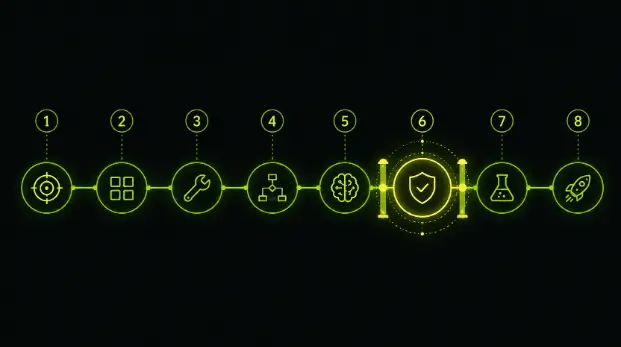
Step 1: Define the Problem Boundary Before You Touch Any Code
This is the step that separates agents that survive production from agents that become expensive experiments. And it has nothing to do with technology.
Before you write a single line of code, you need clear answers to three questions.
What can the agent do on its own? Define the specific actions the agent is authorized to take without human approval. Not capabilities, authorizations. An agent might be capable of deleting records, but authorized only to flag them for review. The distinction matters enormously once the system is running at scale.
When does it escalate to a human? Define the specific conditions under which the agent stops acting and hands off to a person. Low confidence scores. Edge cases outside the training distribution. Actions above a certain financial threshold. Requests that involve sensitive data. These escalation criteria need to be explicit and testable, not vague guidelines that get interpreted differently at runtime.
Who owns the outcome? When the agent makes a decision that turns out to be wrong, who is accountable? This isn’t a philosophical question. It determines how you design logging, monitoring and audit trails. If nobody owns the outcome, nobody will notice when outcomes start degrading.
Write these answers down. Review them with stakeholders. Get sign-off. This document becomes the design spec that every subsequent technical decision is evaluated against.
Step 2: Choose Your Architecture Pattern
There are three dominant architecture patterns for ai agents 2026. Each has tradeoffs. Pick the wrong one and you’ll be rebuilding in three months.
Single agent with tools: One language model that reasons about which tools to call and in what order. This works well for focused, single-domain tasks, a research agent that searches and summarizes, a data extraction agent that pulls information from documents.
The advantage is simplicity. One model, one context window, one reasoning chain. The disadvantage is that it breaks down as complexity increases. Once you have more than eight or ten tools, the model starts making poor tool selection decisions. Once the workflow spans multiple domains, the single context window gets polluted with irrelevant information.
Orchestrator-worker pattern: One coordinating agent that breaks goals into subtasks and routes them to specialized worker agents. The orchestrator handles the “what needs to happen” reasoning. The workers handle the “how to do this specific thing” execution.
This is the pattern that works best for enterprise use cases. It’s debuggable, you can see which worker failed and why. It’s governable, you can set different permission boundaries for different workers. And it scales, adding a new capability means adding a new worker, not retraining the entire system.
The disadvantage is coordination overhead. The orchestrator needs to manage state across workers, handle failures gracefully and ensure context is passed correctly between steps. This is genuine engineering work.
Multi-agent collaboration: Multiple autonomous agents that communicate with each other to solve a problem. Each agent has its own goals, tools and reasoning. They negotiate, share information and coordinate actions.
This sounds exciting in theory. In practice, it’s the hardest pattern to make reliable. Debugging is difficult because the system’s behavior emerges from interactions between agents rather than following a predictable path. Governance is challenging because accountability becomes distributed. Context synchronization between agents is a genuine engineering problem, one agent operating on stale context can cascade failures through the entire system.
Unless you have a specific requirement that demands multi-agent collaboration, start with an orchestrator-worker. You can always add complexity later. You can’t easily remove it.
See also: Why Businesses Need a Portable VOCs Gas Detection Camera
Step 3: Set Up Your Foundation
Here’s the technical stack. I’ll be specific about choices and tradeoffs.
Language model: For the orchestrator, you want the strongest reasoning model you can afford. Claude Sonnet or GPT-4o for most use cases. For workers doing narrow tasks, extraction, classification, or summarization, smaller models work fine and save significant inference cost. When comparing outputs across models or documenting performance differences during development, developers often rely on a Screenshot tool to capture results and share findings with their teams. Model routing, using different models for different tasks based on complexity, is one of the highest-leverage cost optimizations available.
Orchestration framework: LangGraph if you need fine-grained control over the execution flow and explicit state management. CrewAI if you want faster setup with role-based agent definitions. Build from scratch with raw API calls if your use case is simple enough that a framework adds more complexity than it removes.
My recommendation for most production systems: LangGraph. The explicit state management and graph-based execution model make debugging and governance significantly easier than alternatives.
State management: This is where most tutorials skip and most production systems break. Every step in your agent’s workflow needs to persist its state somewhere. What has the agent done so far? What information has it gathered? What decisions has it made? What’s left to do?
For simple agents, in-memory state works. For anything that needs to survive a restart, handle concurrent requests, or maintain conversation history, you need persistent state, Redis for fast ephemeral state, PostgreSQL for durable state that needs to survive failures.
Tool infrastructure: Every external action your agent can take, API calls, database queries, file operations, web searches, needs to be wrapped in a tool definition that includes the function itself, a clear description the model can use to decide when to call it, input validation, error handling and timeout management.
For teams building AI-powered workflows, Linklay can also be useful for connecting and managing digital experiences.
Here’s a basic tool structure in Python:
python
import httpx
from pydantic import BaseModel, Field
class ToolResult(BaseModel):
success: bool
data: dict | None = None
error: str | None = None
class CustomerLookupInput(BaseModel):
customer_id: str = Field(description=”The unique customer identifier”)
async def lookup_customer(input: CustomerLookupInput) -> ToolResult:
“””Retrieve customer details from the CRM.
Use when: you need customer information to process a request.
Do not use when: you already have the customer details in context.”””
try:
async with httpx.AsyncClient(timeout=10.0) as client:
response = await client.get(
f”https://api.internal/customers/{input.customer_id}”
response.raise_for_status()
return ToolResult(success=True, data=response.json())
except httpx.TimeoutException:
return ToolResult(success=False, error=”CRM lookup timed out after 10s”)
except httpx.HTTPStatusError as e:
return ToolResult(success=False, error=f”CRM returned {e.response.status_code}”)
Notice the docstring. The description of when to use and when not to use the tool is as important as the function itself. The model uses this description to decide whether to call the tool. A vague description leads to poor tool selection decisions at runtime.
Step 4: Build the Orchestration Layer
This is the core of your agent system. The orchestrator takes a goal, breaks it into steps, executes each step using the appropriate worker or tool, evaluates the result and decides what to do next.
Here’s a simplified orchestration pattern using LangGraph:
python
from langgraph.graph import StateGraph, END
from typing import TypedDict, Annotated
import operator
class AgentState(TypedDict):
goal: str
steps_completed: Annotated[list[str], operator.add]
current_step: str
context: dict
requires_human_review: bool
final_output: str | None
def plan_steps(state: AgentState) -> AgentState:
“””Orchestrator decides what steps are needed.”””
# LLM call to break the goal into executable steps
# Returns updated state with planned steps
def execute_step(state: AgentState) -> AgentState:
“””Worker executes the current step using appropriate tools.”””
# Route to the right worker based on step type
# Execute with tools, capture result
# Update context with new information
def evaluate_result(state: AgentState) -> AgentState:
“””Check if the step succeeded and decide next action.”””
# Evaluate output quality
# Check if escalation criteria are met
# Determine if goal is achieved or more steps needed
def should_continue(state: AgentState) -> str:
if state[“requires_human_review”]:
return “escalate”
if state[“final_output”] is not None:
return END
return “execute”
# Build the graph
workflow = StateGraph(AgentState)
workflow.add_node(“plan”, plan_steps)
workflow.add_node(“execute”, execute_step)
workflow.add_node(“evaluate”, evaluate_result)
workflow.add_node(“escalate”, human_escalation_handler)
workflow.set_entry_point(“plan”)
workflow.add_edge(“plan”, “execute”)
workflow.add_edge(“execute”, “evaluate”)
workflow.add_conditional_edges(“evaluate”, should_continue)
agent = workflow.compile()
The key architectural decision here is explicit state. Every node in the graph receives the full state, modifies it and passes it forward. When something goes wrong at any step, you can inspect the state to see exactly what happened and why. This is not optional for production systems. Without it, debugging agent failures becomes guesswork.
Step 5: Implement Memory and Context Management
Agents need two types of memory. Short-term memory is the conversation context and workflow state for the current task. Long-term memory is accumulated knowledge that persists across tasks, user preferences, historical patterns, domain-specific knowledge.
Short-term memory is handled by your state management layer. The state object carries everything the agent needs for the current task. Keep it structured. Every piece of information should have a clear schema, not just dumped text that the model has to parse.
Long-term memory requires a retrieval system. The most common pattern is a vector database, Pinecone, Weaviate, pgvector, that stores embeddings of past interactions, documents and domain knowledge. The agent retrieves relevant context before making decisions.
The mistake most teams make with retrieval is treating it as a simple lookup. In practice, retrieval quality determines agent quality. A retrieval system that returns irrelevant context is worse than no retrieval at all, because the model will reason over the irrelevant information and produce confidently wrong outputs.
Invest in retrieval quality. Chunk documents thoughtfully. Use hybrid search, combining vector similarity with keyword matching. Test retrieval results against known-good queries before connecting it to your agent. The best agent architecture in the world produces garbage if the context it reasons over is wrong.
Step 6: Build the Governance Layer
This is where most tutorials stop and most production failures start.
For anyone building agents that will operate in real business environments, understanding how to build an ai agent step by step guide that includes governance from the start, not as a post-launch addition, is what separates production-grade systems from impressive demos.
Permission boundaries. Define what each agent or worker can access and modify. Use the principle of least privilege, the agent should have access to exactly what it needs for its task and nothing more. A customer service agent doesn’t need write access to the billing system. An analysis agent doesn’t need access to raw PII.
Audit logging. Every action the agent takes needs to be logged with enough detail to reconstruct the decision chain after the fact. What was the input? What context was retrieved? What reasoning did the model produce? What action was taken? What was the outcome? Store these as structured logs, not just text dumps.
python
import structlog
from datetime import datetime, timezone
logger = structlog.get_logger()
async def logged_tool_call(tool_name: str, input_data: dict, agent_id: str):
start_time = datetime.now(timezone.utc)
logger.info(
“tool_call_started”,
agent_id=agent_id,
tool=tool_name,
input=input_data,
timestamp=start_time.isoformat()
try:
result = await execute_tool(tool_name, input_data)
logger.info(
“tool_call_completed”,
agent_id=agent_id,
tool=tool_name,
success=result.success,
duration_ms=(datetime.now(timezone.utc) – start_time).total_seconds() * 1000,
timestamp=datetime.now(timezone.utc).isoformat()
return result
except Exception as e:
logger.error(
“tool_call_failed”,
agent_id=agent_id,
tool=tool_name,
error=str(e),
duration_ms=(datetime.now(timezone.utc) – start_time).total_seconds() * 1000
Drift detection. Agent behavior changes over time model updates, data distribution shifts, retrieval quality degradation. You need monitoring that catches these changes before they affect users. Track output quality metrics, tool call patterns, escalation rates and error rates. Set alerting thresholds. A sudden spike in escalations or a gradual decline in task completion rate are early signals that something has changed.
Human escalation paths. The escalation isn’t just “send it to a human.” It’s routing the right case to the right person with the right context already assembled. When an agent escalates, the person receiving the case should see what the agent attempted, what information it gathered, why it escalated and what it recommends. The human shouldn’t need to start the task from scratch.
Step 7: Test Like the System Will Be Adversarial
Standard unit tests aren’t sufficient for agent systems. The model’s behavior is probabilistic. The same input can produce different reasoning paths. Edge cases are, by definition, the inputs your tests didn’t anticipate.
Evaluation sets. Build a set of test cases that cover the expected input distribution, including edge cases, ambiguous inputs and adversarial inputs. Run your agent against this evaluation set on every significant change. Track pass rates over time. A declining pass rate is an early signal of regression.
Boundary testing. Specifically test the boundaries you defined in Step 1. Give the agent inputs that are just outside its authorized scope. Does it correctly decline? Give it inputs that should trigger escalation. Does it escalate? Give it conflicting information. Does it handle uncertainty appropriately?
Integration testing under failure. What happens when an API call times out? When a tool returns an error? When the database is temporarily unavailable? Agent systems have many more failure modes than traditional software because they interact with more external systems. Every integration point needs error handling that’s been tested with actual failure scenarios, not just happy-path assertions.
Load testing. How does the system behave under concurrent requests? Does state management hold up? Do API rate limits get hit? Does latency degrade gracefully or catastrophically? Production traffic patterns are rarely uniform. Test with realistic load patterns, including spikes.
Step 8: Deploy with Observability
Deployment is not the end. It’s the beginning of the part where you learn what your agent actually does when it encounters real-world inputs.
Structured logging that captures the full decision chain for every request. Not just errors, every decision, every tool call, every escalation. You need to be able to reconstruct what happened on any specific request after the fact.
Metrics dashboards that track task completion rate, average latency, escalation rate, tool call success rates, error rates by type and cost per task. These metrics are your early warning system.
Alerting on anomalies. A sudden change in any of these metrics warrants investigation. An escalation rate that jumps from 15% to 35% might mean the input distribution changed. An error rate spike on a specific tool might mean the external API is down. A gradual increase in average latency might mean the context window is growing beyond what the model handles efficiently.
Canary deployments. Route a small percentage of traffic to new versions before full rollout. Compare metrics between the canary and the stable version. If the canary shows degradation, roll back before it affects all users.
The Honest Truth About Building Agents in 2026
Building an AI agent that works in a demo is a weekend project. Building one that runs reliably in production for twelve months is a serious engineering effort that requires architecture discipline, governance infrastructure, testing rigor and operational monitoring.
Technology has never been more capable. The models are genuinely good. The tooling is production-ready. The frameworks are mature. What’s still hard and will remain hard, is the systems engineering around the model. State management, error handling, security boundaries, governance, observability and the organizational work of defining what the agent should and shouldn’t do.
The agents that survive production are the ones built by teams that treated the model as one component of a larger system, not as the system itself. Everything around the model, the orchestration, the tools, the governance, the monitoring, is what determines whether the agent is still running and creating value a year from now.
Start with a narrow problem. Define the boundaries before you code. Build governance from day one. Test adversarially. Deploy with observability. Iterate based on what production teaches you.
That’s how you build an agent that lasts.