Is Online QR Generator.com Worth Switching To? Our Review
A printed QR code usually can’t be changed. If the link breaks or the menu price updates, you’re reprinting the whole batch. Online QR Generator says its codes stay editable even after printing, so we signed up to see whether that holds up in practice.
Our honest review of Online QR Generator: 4.8/5. For more feedback, you can check out Trustindex reviews. It offers dynamic codes that genuinely stay editable after printing, real analytics, and a design editor that goes deeper than expected.
Getting Started Without the Friction
Many QR tools want your card details before you’ve even seen the dashboard. Online QR Generator doesn’t do that. After registration, the first screen asks what kind of content the code should point to, a website, a PDF, a vCard, WiFi credentials, a menu, an app link, and a dozen other formats. Pick one, and the editor opens immediately.
There’s no forced tutorial, no pop-up asking to book a demo call. For anyone who’s used a handful of these generators, that alone is refreshing.
What Online QR Generator Actually Does
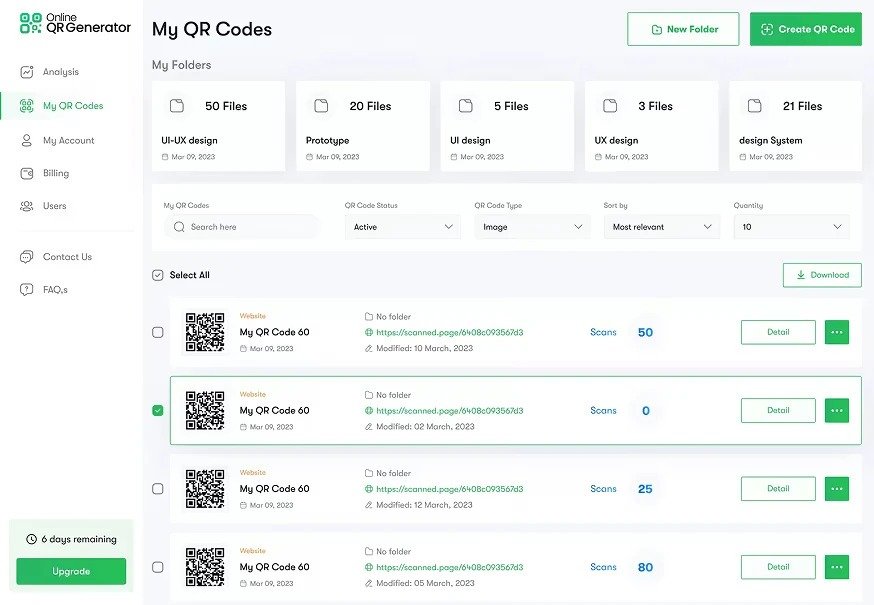
At its core, this is a dynamic QR code platform. The distinction matters more than it sounds. A static code, once printed, points to one destination forever. A dynamic one is different. The printed image stays put, but you can swap the link, address, or file behind it whenever you need to, even months after the code’s already out in the wild.
Everything else gets built around it: editable content after publishing, per-code analytics, and enough design flexibility that the code doesn’t scream “generated by a robot in 2004.”
Design and Customization
Colors, corner shapes, pattern styles, logo placement, frame text, it’s all adjustable through a visual editor, not buried three menus deep. Changes preview in real time too, so you skip the usual export-check-re-export loop.
A few things worth calling out:
- Logos can be dropped directly into the center of the code without breaking scannability, something cheaper generators often get wrong
- Frames come with customizable call-to-action text (“Scan me,” “View menu,” and similar), useful for print materials
- Color contrast gets flagged automatically if it risks making the code unreadable
- Shape presets extend past the default squares, rounded modules and dot patterns are both available without needing a separate “pro design” unlock
None of this is groundbreaking on its own. Put together, though, it adds up to more design control than most competitors bother building. You notice it once you’re printing at scale, not just knocking out one code for a flyer.
QR Code Types: Wider Than Expected
Beyond the standard URL code, the platform supports vCards, PDFs, images, video, WiFi network sharing, restaurant menus, business profiles, MP3 files, app store links, coupon codes, and social media bundles. For a business card alone, the vCard format lets you add phone, email, physical address, and social links, all scannable from a single code, editable after the fact.
The menu format deserves a separate mention. A restaurant can build a full digital menu right there, categories, prices, photos, no website builder required, and update it the same day a dish changes.
We didn’t test every single type, but the ones we did, vCard, WiFi, and a simple website redirect, all worked exactly as described. No dead links, no broken formatting on scan.
Landing Pages Without Building a Website
One feature stood out more than we expected: the platform can generate a landing page for a QR code instead of just redirecting to an external URL. That means someone without a website can still create something scannable that looks intentional rather than like a raw link pasted into a code.
For small businesses testing an idea, or for a one-off event, that removes an entire step most competitors assume you’ll handle elsewhere. Pair it with the menu or vCard formats, and you’ve effectively got a one-page site generator bundled into a QR tool, which isn’t something we expected to find here.
Tracking and Analytics
Every dynamic code tracks its own scans. The dashboard shows when someone scanned it, roughly where from, and what kind of device they used. It’s not built for deep marketing attribution, there’s no cohort analysis or funnel breakdown, but for anyone who wants to know whether a printed flyer or a product label is actually getting scanned, it’s more than enough.
Who This Tool Actually Fits
A few scenarios where the platform makes practical sense based on what we tested:
- A café or restaurant that changes its menu seasonally and doesn’t want to reprint table cards every time
- A small business running a pop-up event, where a landing page beats setting up a temporary website
- Anyone handing out business cards who’d rather share a vCard than dictate a phone number
- Marketers who want basic scan analytics on printed materials without committing to an enterprise platform
Where it’s probably overkill: a single one-time use, like a static code linking to a PDF that will never change. For that, a free static generator does the job without extra setup.
See also: Understanding the Process of Establishing an International Business
Pricing and the Free Trial
Online QR Generator publishes its plans openly on a dedicated pricing page, which is more than some competitors do.
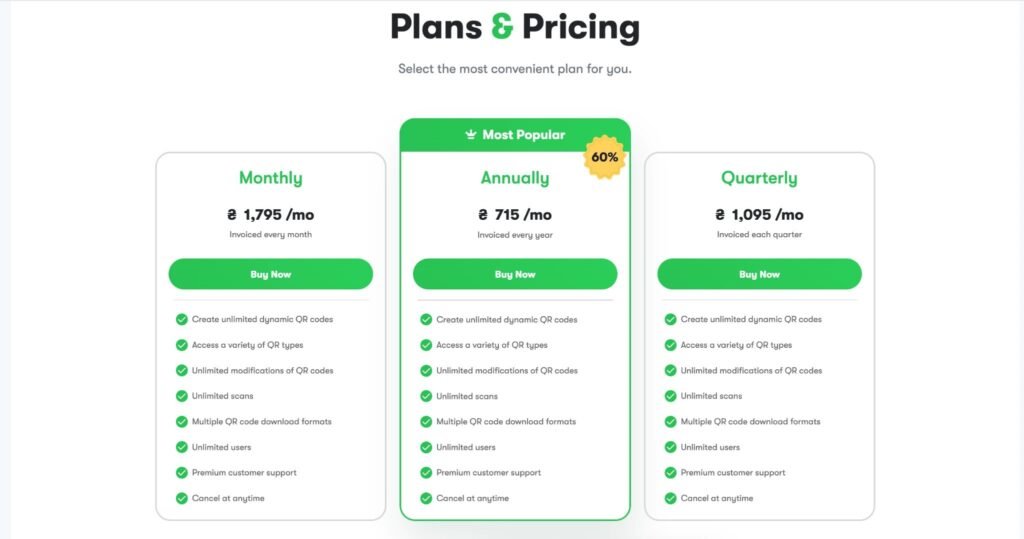
What’s a little unusual is how those plans are structured. Most tools tier by feature, pick “Basic” and lose access to analytics or bulk creation. Here, the three tiers (monthly, quarterly, annual) all unlock the exact same feature set: unlimited dynamic codes, unlimited scans, every code type, unlimited team seats, premium support. The only thing that changes is the billing cycle and the savings that come with committing longer. The annual plan works out as the cheapest per month, roughly 60% less than paying monthly, with quarterly landing in between. Pricing is shown in local currency depending on where you’re signing up from.
A Few Common Questions
- Can a code be edited after it’s already printed? Yes, as long as it’s dynamic code. The printed image stays the same while the destination behind it changes.
- Does the trial actually unlock everything? Based on our test, yes. We didn’t run into any feature gates during the trial, everything we tried was available.
- Is it useful without a website? More than we expected. The built-in landing page and menu formats cover a lot of the “I don’t have a site yet” use case on their own.
Final Take
If you need a QR code that can change after it’s printed, want real design control without hiring a designer, and would rather test the full product than a limited demo, Online QR Generator holds up well. It’s not the flashiest name in the category. The core mechanics work: editable codes, solid analytics, a design editor that’s actually usable.
We’re comfortable putting this one at 4.8 out of 5. At minimum, it’s worth the trial before you decide whether it earns a spot on the paid tier.