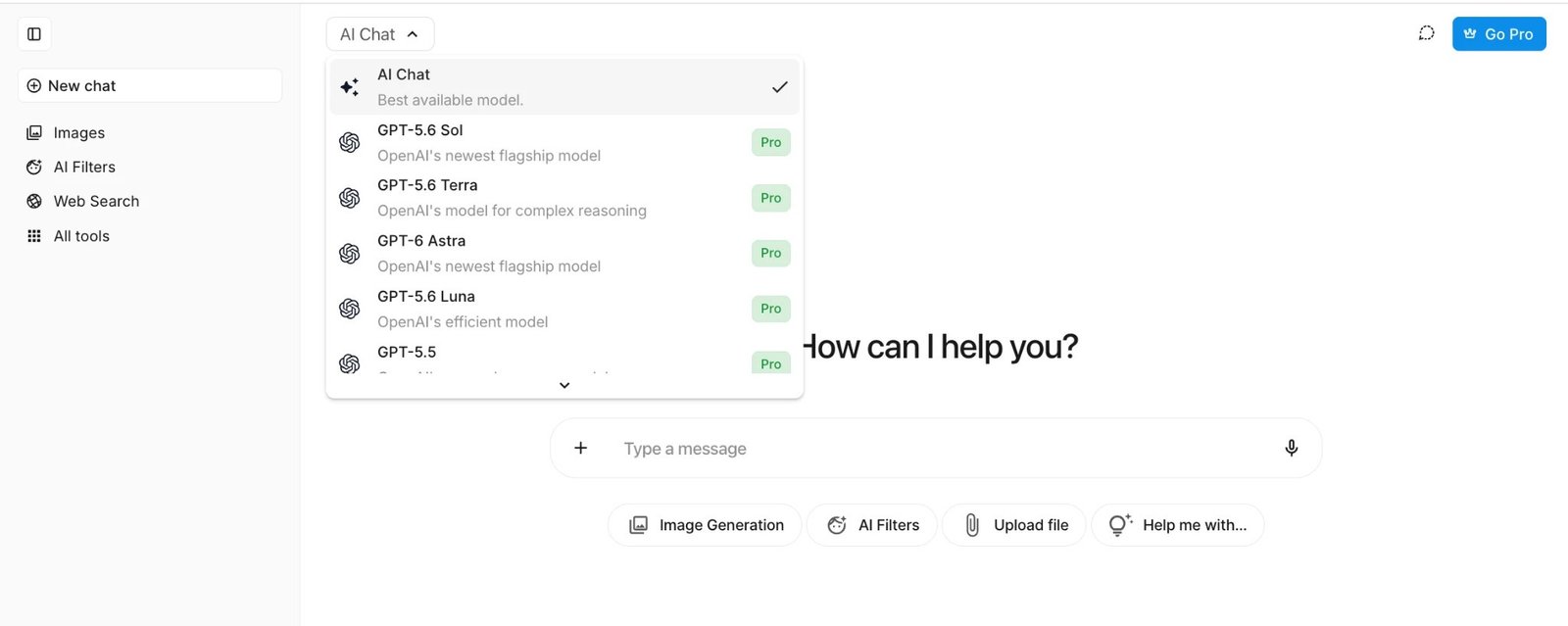
Simpl.ai Review: Dozens of AI Models, One Chat Window, One Subscription
Separate subscriptions for ChatGPT, Claude, and Gemini add up fast, not to mention the constant tab-switching mid-research. You start a question in one app, realize another model would handle it better, copy everything over, lose your train of thought somewhere in between.
Simpl.ai‘s whole idea is to put a long list of AI models behind one login and one chat window instead, so the switching happens in a dropdown, not across five browser tabs and five separate billing cycles.
We spent a few weeks using it for everything from chat and images to documents and voice, testing whether the “one platform, every model” promise actually holds up beyond the marketing page and in daily use. Short answer: mostly, yes. Our take: a solid 4.9 out of 5. It’s not perfect, but it does what it says on the tin. Before subscribing we also recommend to check Simpl.ai reviews on Trustindex.
What Simpl.ai Actually Is
No model of its own here. Simpl.ai is more of a gateway, plugging you into models from OpenAI, Google, Anthropic, xAI, and a handful of others through one dashboard. Pick whichever fits the task, or let the interface point you toward one. Type and go. Skip the API keys, skip juggling five separate logins.
Setting Up and First Impressions
Takes about a minute. Instead of a password, Simpl.ai emails a verification code, though you can set one up later if you’d rather log in the old way. Google, Facebook, and Outlook sign-in are all there too, which cuts the whole thing down to two clicks.
The interface itself doesn’t try too hard. Model picker at the top, chat history in the sidebar, nothing else competing for attention. Anyone who’s stared blankly at ChatGPT’s settings menu will get why that matters.
The Model Lineup
The catalog runs well beyond the usual three or four names, covering nearly every major AI lab currently shipping models:
| Provider | Models available | Good for |
| OpenAI | GPT-6 Astra, GPT-5.6 Sol, GPT-5.6 Terra, GPT-5.6 Luna, GPT-5.5, GPT-5.5 Instant, GPT-5.4-nano | General tasks, quick answers, brainstorming |
| Gemini 3.1 Pro, Google Gemini 3.8 Flash, Gemini 3.1 Flash-Lite, Gemini 2.5 Flash | Coding, reasoning, long documents | |
| Anthropic | Claude Mythos 5.1, Claude Fable 5.1, Claude Opus 4.8, Claude Sonnet 5, Claude Haiku 4.5 | Longer writing, nuanced analysis |
| xAI | Grok 4.6, Grok 4.3, Grok 4.20 Reasoning | Reasoning-heavy questions |
| DeepSeek | Deepseek V4 Pro, Deepseek V4 Flash | Fast, budget-friendly reasoning |
| Others | Alibaba Qwen3.7-Max, Moonshot Kimi-K3, Z GLM-5.3, Llama 4, Copilot, Sonar 2 | Niche use cases, search-heavy queries |
New models get tagged as they land, so there’s no static list to guess your way through. Switching mid-conversation works, though context doesn’t always follow you from one provider to the next. A fresh chat when you jump models keeps things cleaner.
Beyond Chat: The Extra Tools
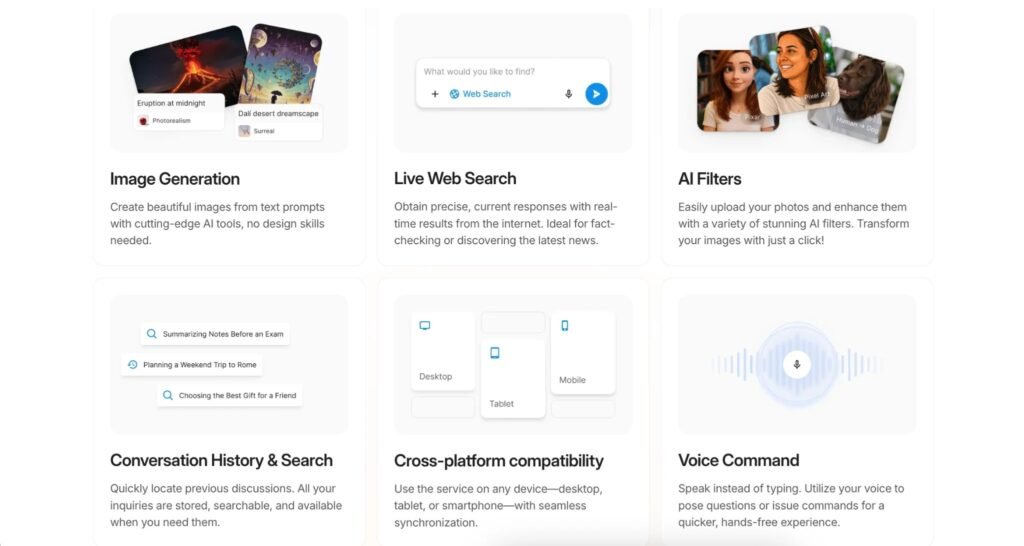
Chat isn’t the only thing here. Simpl.ai also throws in:
- Image generation
- AI photo filters
- Live web search
- Voice command
- Conversation history and search
- Cross-platform sync across desktop, tablet, and phone
Nothing on that list reinvents anything. The value is in not needing five separate apps to get to it.
A Day With Simpl.ai
Picture a freelance researcher pulling together a client report. Pop into Simpl.ai, switch to a reasoning model for the latest data, then over to Claude for the actual write-up, something that doesn’t read like a template. Upload a competitor’s PDF partway through, ask it a few direct questions instead of skimming forty pages solo. Need a quick chart for the deck? Generate one without leaving the tab.
That’s the scenario Simpl.ai is built for. Someone who needs different strengths from different models within one project, without re-logging into three separate services to get there. It works. Transitions between tools aren’t always instant, but smooth enough that the workflow doesn’t feel choppy.
Where It Falls Short a Little
No platform is flawless, and a few things are worth knowing.
Switching between models occasionally needs a beat to reorient. Each one has its own personality and response style, and Simpl.ai doesn’t smooth that transition completely. The mobile experience is functional but noticeably tighter than desktop, especially when working with document uploads on a smaller screen.
There’s also a short learning curve in knowing which model to reach for out of dozens of options. Simpl.ai gives general guidance, but figuring out that one model handles search-heavy questions better while another is stronger at longer writing takes a session or two of trial and error. Once that’s mapped out, it stops being an issue.
See also: Understanding the Process of Establishing an International Business
Our Take
Simpl.ai does what it sets out to do. It takes a long, genuinely impressive list of AI models that usually live in separate apps and puts them behind one clean interface. The model catalog alone sets it apart from most competitors in this space, and the extras add real value.
The rough edges are minor. Model switching isn’t perfectly seamless, mobile trails a step behind desktop. Neither is a dealbreaker.
For anyone tired of paying for and logging into multiple AI subscriptions separately, Simpl.ai is a reasonable answer, and one that held up well across everything we threw at it during testing. 4.9 out of 5, with that model lineup doing most of the heavy lifting to earn the score.