How to Create Private Call Spaces in an Open-Plan Office
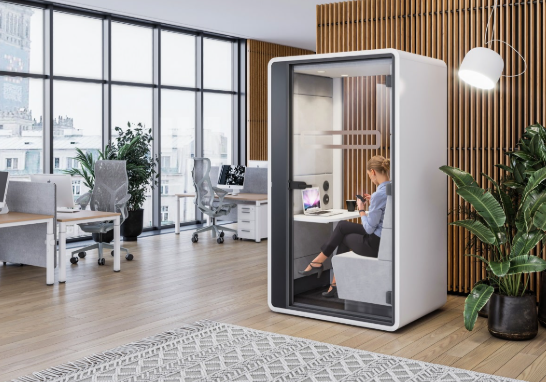
Open-plan offices run out of private call space once headcount outgrows the meeting rooms. The fix is a dedicated zone of office privacy booths, not another bookable conference room. Audit where calls disrupt people, zone the floor plan, then place office privacy booths from Quell Workspaces near the desks that use them most. Lead times start from 4 weeks, so plan the rollout before the complaints start.
Open-plan layouts solve collaboration problems and create privacy ones. A sales call, a one-to-one with HR or a client video meeting all need a few minutes of acoustic separation that a desk cluster cannot provide. This guide walks through building a private call space that gets used, from auditing the noise problem to setting booking rules that stop one booth becoming someone’s personal office.
What you’ll need
- A floor plan or rough sketch of the current office layout
- A week of observation notes on where calls happen and where people complain about noise
- A power socket near each proposed booth location
- A simple booking method: shared calendar, app or sign-up sheet
- Office privacy booths from Quell Workspaces, sized to your call volume and team size
Step 1: Audit where calls are disrupting people
Walk the floor for a full working week and note where calls happen and where complaints come from. This identifies the real hotspots instead of assuming the loudest desk cluster is the problem.
Look for patterns: a sales team beside a thoroughfare, HR holding sensitive conversations at an open desk, or one meeting room booked back-to-back for calls that need only one person. The outcome is a short list of two or three zones where private call space removes the most friction.
Common mistake: auditing for a single day. Call patterns shift around Monday planning meetings and Friday wrap-ups, so one snapshot misses half the problem.
Step 2: Zone the floor plan around focus work and collaboration
Separate the office into zones before adding any furniture. Privacy fixes only work when they sit where quiet work is meant to happen, not scattered between desks.
Mark a collaboration zone near meeting rooms and breakout areas, and a focus zone away from printers, the kitchen and busy walkways. Office privacy booths belong in the focus zone, within a short walk of the desks that use them most, so staff do not avoid them because they are inconvenient.
Expected outcome: a floor plan with clearly marked zones that facilities and staff can both use when deciding where a call should happen.
Step 3: Choose the booth size and type for your call volume
Match the booth to how calls actually happen in your office. This step decides whether the private call space is used daily or sits empty.
A single-person phone booth suits solo video calls, interviews and short confidential conversations. Larger private meeting rooms from Quell Workspaces suit small huddles or client calls that need a second attendee. Let the audit from Step 1 set the mix: if most disruption comes from solo calls, prioritise single-occupant units.
Check before ordering:
- The footprint fits the zone from Step 2 without blocking walkways or exits
- Lead time: Quell Workspaces quotes lead times from 4 weeks, so order ahead of an office move or headcount increase
- Delivery and installation terms, confirmed directly with Quell Workspaces
- Product specifications, taken from the product pages rather than assumed
Limitation: a booth solves acoustic separation, not desk shortage. If the real issue is too few workstations, booths will not fix it.
Step 4: Position booths away from high-traffic routes
Place each booth where people naturally pass on their way to a call, not in a dead corner nobody walks past. Location decides whether staff adopt the space or keep taking calls at their desks out of habit.
Avoid spots directly beside printers, kitchens or main walkways. A position visible from the main floor but set slightly back from the busiest route tends to get used most.
Common mistake: pushing every booth into leftover corner space because it is the only free floor area.
Step 5: Set up the booth for video calls, not just voice
Most private calls now involve video, so the booth needs to support both. This is the difference between a space people tolerate and one they choose.
Confirm there is easy access to a power socket for a laptop and headset charger. Keep a short checklist beside each booth, covering headset, laptop and charger, so nobody carries loose cables across the office for every call.
Expected outcome: a booth that works for a scheduled video call as well as a quick unplanned phone call.
Step 6: Set booking rules before rollout
Decide how booths are booked, and for how long, before announcing them. This prevents the most common failure: one or two people treating a shared booth as a personal office.
Keep the rules simple. Cap single bookings at 30 minutes, require a calendar booking for anything longer, and make unbooked booths first-come, first-served for short calls. Share the rules in the same announcement that introduces the booths.
Troubleshooting and common mistakes
Booths are fully booked by mid-morning. There are too few units for the demand found in Step 1. Revisit the audit and add capacity in the busiest zone rather than spreading units thinner.
Staff still take calls at their desks. Check the walking distance from the busiest desks to the nearest booth. If it is long, people default to the desk, and the fix is relocation, not better signage.
One person treats the booth as a personal office. This is a booking-rule failure. Tighten the time cap from Step 6 and make the booking calendar visible to the whole team.
Video calls sound echoey. Check the door is fully closed and that nothing has been added inside the booth after installation.
Wi-Fi drops inside the booth. Test signal strength at the exact booth location before ordering, and add a network extender if needed.
Tools and resources
- Quell Workspaces office privacy booths: acoustic phone booths and private meeting rooms for solo and small-group calls, with lead times from 4 weeks.
- A shared booking calendar or sign-up app: keeps usage fair once booths go live.
- A noise-complaint log: a shared spreadsheet is enough to show which zones still generate complaints after rollout.
FAQ
How many office privacy booths does an open-plan office need?
Size capacity to the number of simultaneous calls at peak times found in your Step 1 audit, then add one spare unit for busy weeks.
Do office privacy booths replace meeting rooms?
No. They handle solo and small-group private calls. Meeting rooms still serve larger discussions and client visits.
Where should office privacy booths go in an open-plan layout?
In the focus zone from Step 2, close to the desks that use them most but set back from printers, kitchens and main walkways.
How long does it take to get office privacy booths?
Quell Workspaces quotes lead times from 4 weeks, so order ahead of a planned move or headcount increase.
Why don’t staff use new private call space?
Usually location. A booth too far from daily desks gets ignored however well it is equipped. Step 4 covers how to avoid this.
Can one booth handle both phone and video calls?
Yes, provided it has power access for a laptop and headset, as covered in Step 5.
See also: Understanding the Process of Establishing an International Business
Conclusion
Private call space in an open-plan office comes down to three decisions: where the noise problem actually is, where each booth sits relative to daily foot traffic, and how booking is managed once it is live. Skip the audit and you order the wrong size and number of units. Skip the booking rules and one person annexes the booth within a week. Office privacy booths from Quell Workspaces fit this workflow, with lead times from 4 weeks, which makes planning a rollout around a move or headcount increase straightforward.